
GPS Tracking Device Installation
GPS Support - Tracking System Alerts
Our Tracking System GPS Alerts are triggered when a vehicle violates a pre-set parameter, such as overspeed or crossing a Geofence boundary, for example. An automatic email is sent, with details such as date, time, location for a situation which merits attention.
Email alerts can be sent to your Cellphone or DeskTop Device. You can monitor your company while out of the office or away from your desk.
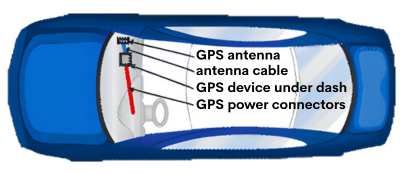
GPS Installation Diagram
A clear view of the sky is important for the location of the GPS antenna. It MUST be placed in an open space not obscured by metal.
Step One
Determine a location for the GPS device. We recommend installation behind the glove box under the dash. This location allows the antenna to “look” up through the windshield for its signal. Much of this space will likely be used by the passenger airbag but usually there is enough available space somewhere in this area to mount the device.
Once you have installed the device, plug the data port attached to one end of the cable into the unit. For powering the GPS unit we suggest connecting the wires at the other end of the cable to the vehicle fuse panel. For the green or white wire labelled gnition, look for a source that will go OFF/ON with the key. For the red wire labelled battery, look for a source that is always “HOT”.
Important:
Ensure that this source does not go OFF/ON when the Ignition is switched OFF/ON.
Determine the fuse used in your vehicle and connect these 2 wires using the supplied connectors. For the black wire labelled ground, find a source that is chassis grounded. You may need to drill mount your own screw for this connection.
Note:
To provide a secure connection and to avoid severing or pinching these fine wires, we suggest stripping about 1" and folding the wire twice before inserting into and crimping the connector. Use the cable ties (supplied) to secure the cable.
GPS Fleet Tracking Support and Instructions
Tracking System GPS AnyPlace Technical Support and Instructions. If you need further assistance please call Gary at (313) 402 0700, or for IT support please contact Robin on (813) 419 4382

To find out more about how to Install Your Device, contact us.
Questions about Installation? Let's Talk
34719 Sykes Road St. Helens, OR 97051
Phone: 313-402-0700
Monday - Friday 9AM to 5PM
Saturday - 9AM to 5PM
Sunday - Closed
24 Hour Customer Support 7 Days a Week (313) 402-0700


About Our Company
GPS AnyPlace Tracking Solutions
We offer GPS tracking for fleets and individual vehicles, marine vessel tracking, trailer tracking and gps equipment tracking devices. Our range of gps tracking personal solutions also includes gps personnel trackers for teenager tracking. We offer full satellite communication devices for land and marine applications where GSM/cellular networks are unavailable, to monitor such things as methane pump operations at coal mines, ocean buoys and cargo containers.
New this year GPS AnyPlace, LLC has added Garmin Marine Electronics™, Garmin Trolling™ motors and Auto Pilots, as well. We also offer EPOCH and Powerhouse Lithium batteries.
Copyright ©2025 GPS AnyPlace. All Rights Reserved. Designed by 5 Star Web Design & Your Social Media Experts - Brandi Edwards Designs